
Business travel gets easy the moment you stop “winging it” and start running a repeatable system. If you’ve ever landed worn out, realized you forgot a charger, missed a reimbursement detail, or lost an hour hunting for a quiet place to take a call—this guide is your upgrade. We’ll cover a pro-level workflow you can reuse on every trip, whether you travel 2x/month or 2x/week.
Affiliate disclaimer: TravelForBusiness.org participates in affiliate programs, including Amazon Associates, and may earn a commission from qualifying purchases at no extra cost to you.
Quick Answer (TL;DR)
To travel like a pro, build a standard operating system for every trip:
- Start with the mission: goal, must-attend meetings, deliverables, and “no-fail” times.
- Book for reliability: nonstops when it matters, buffers where it doesn’t, loyalty where it counts.
- Pack a capsule kit: a prebuilt tech pouch, toiletries, and “save the day” items.
- Protect your energy: hydration, meal timing, light exposure, and a simple sleep plan.
- Make reimbursements automatic: capture receipts daily + use the same categories every trip.
- Run your travel-day checklist: documents, battery, seat strategy, and arrival routine.
If you want the complete playbook (and the step-by-step), keep reading.
Understanding the Question
When people ask “how to travel for work like a pro,” what business travel actually means:
- Less friction: fewer surprises, less stress, faster airport/hotel routines.
- More output: you land ready to perform (not recover).
- Policy + reimbursement mastery: fewer rejected expenses and faster payback.
- Smarter points/status: You earn rewards without making bad itinerary choices.
- Consistency: your “good trips” become your regular trips.
Pros don’t rely on motivation—they rely on systems.
Detailed Explanation
The pro framework: Reliability, Readiness, Recovery
Think of every work trip in three phases:
- Reliability (Before): booking decisions that prevent chaos (buffers, backups, policy alignment).
- Readiness (During): packing + routines that keep you productive in transit and on site.
- Recovery (After): fast expense submission and a reset that prevents burnout.
If you build a repeatable workflow for all three, your travel becomes predictable—in the best way.
Your “minimum viable kit” (MVK)
The fastest way to level up is to keep a go-bag system that’s always 80% ready:
- Tech: chargers, cable set, power bank, travel adapter (if needed), earbuds.
- Work essentials: laptop sleeve, pen, tiny notebook, business cards (if relevant).
- Health: electrolyte packets, simple snacks, meds, eye mask.
- Backup plan: one “presentable” outfit and a spare shirt.
That kit lives in your bag—so packing becomes “top up,” not “start over.”
Loyalty points without bad decisions
Pros maximize points after they protect reliability. A simple rule:
- Choose the itinerary that prioritizes your meeting and your energy.
- Then optimize loyalty within those constraints (same airline alliance, same hotel brand, same credit card category).
Step-by-Step Process
Step 1: Define the mission (10 minutes)
Before you open any booking site, write:
- Primary outcome: What must be true by the end of this trip?
- Critical times: meeting start times, client dinner, and presentation slot.
- Constraints: policy rules, budget cap, client preference, and required airline/hotel portals.
- Energy needs: do you need to arrive fresh (big presentation) or can you arrive late (internal meeting)?
Pro tip: If arriving fresh matters, prioritize nonstop flights, early arrival, and a hotel near the venue.
Step 2: Book strategically (reliability first)
Flights
- Nonstop > connecting when you have a hard start time the next morning.
- If you must connect, pick routes with multiple later backup flights.
- Add buffers: landing at least 2–3 hours before a must-attend meeting (more in winter or storm seasons).
Hotels
- Stay close to the work site unless you’re intentionally mixing business/leisure.
- Confirm:
- early check-in options
- quiet room requests
- gym access/breakfast hours (small things that protect your routine)
Car/ground transport
- Plan the first mile: rideshare, taxi, rental car, or public transit.
- Take a screenshot and confirm pickup instructions if arriving late.
Step 3: Build a “one-screen itinerary”
Pros don’t hunt across apps. Create a single note (or TripIt-style view) with:
- Flight numbers + confirmation codes
- Hotel address + check-in/check-out + confirmation code
- Ground transport plan
- Meeting times + addresses
- A “panic list”: who to call if something breaks (travel desk, client contact)
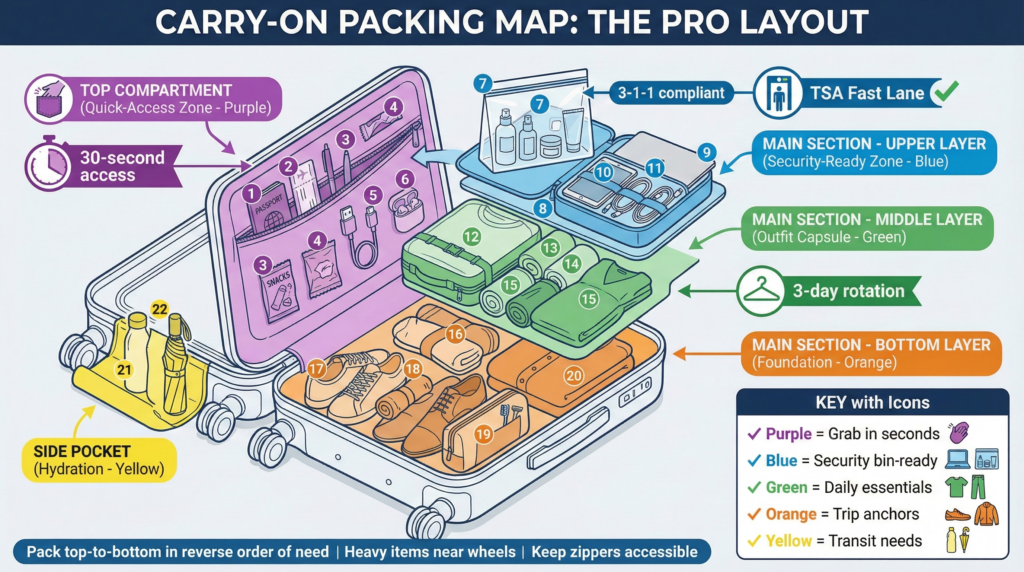
Step 4: Pack using the pro packing template
Pack in layers:
- Work core: laptop + charger + tech pouch
- Clothing capsule: interchangeable pieces (2–3 tops, 1–2 bottoms, 1 blazer/outer layer)
- Toiletries core: duplicates that live in your kit
- Save-the-day items: stain wipe, blister patch, mini lint roller
Packing efficiency:
Packing cubes turn your carry-on into a filing cabinet—fast, tidy, and repeatable.
Packing Cubes (Amazon)
Carry-on reliability:
If you want lighter weight and easy overhead handling for frequent trips, this is a solid workhorse option.
Travelpro Maxlite 5 Carry-On Spinner
Step 5: Travel day execution (run your checklist)
Use a simple checklist before you leave:
- Wallet, ID/passport, backup card
- Laptop + charger + cables
- Power bank charged
- Liquids are compliant and accessible
- One clean outfit in case of delays
- Meeting materials offline (PDF saved locally)
Seat and airport strategy:
- If you work, an aisle seat often wins (bathroom access + movement).
- If you must rest, a window seat reduces interruptions.
- Board with a plan: quick-access pouch at the top, headphones ready, and laptop easy to pull.
Step 6: Land and set your “first 30 minutes”
Pros don’t drift. The first 30 minutes after arrival set the tone for the trip:
- Get water and a light meal.
- Check into the hotel/drop bag.
- Do a 10-minute reset walk (light exposure helps jet lag).
- Confirm tomorrow’s start time and route.
If you’re crossing time zones, pick one anchor habit (same bedtime routine, same morning caffeine timing, same light exposure pattern). Consistency beats complexity.
Step 7: Make expenses painless (daily, not later)
The reimbursement trap is waiting until the end. Pros do this daily:
- Take receipt photos immediately
- Add context (client name, purpose, city).
- Tag categories the same way every trip.
Reimbursement speed:
If you handle many paper receipts, a portable scanner can save significant time and reduce rejected claims.
Portable Receipt ScannerReimbursement-Ready Expense Organizer Reimbursement-Ready Expense Organizer
Select your expense types and get a proof checklist + a daily capture routine that prevents rejected claims.
Select Expense TypesTip: Most delays happen because receipts lack context (who/what/why).
Tips and Best Practices
Pre-trip
- Pack duplicates (chargers, toiletries) so you never unpack your core kit.
- Put a travel policy summary in your notes (meal caps, hotel limits, preferred vendors).
- If you’re self-funded, decide your “spend rules” upfront (comfort upgrades vs savings).
In transit
- Hydrate early; avoid arriving dehydrated and then “chasing it” at night.
- Eat “boring but stable” food when performance matters (don’t gamble on heavy meals).
- Protect your focus: use noise-canceling headphones, one work block, and one recovery block.
At destination
- Keep mornings predictable: the same breakfast routine, the same 10-minute planning routine.
- Build a portable office: laptop stand (optional), compact mouse, and one adapter.
- If you’re client-facing, always have one “meeting-ready” outfit separated.
After the trip
- Submit expenses within 24–48 hours.
- Reset your kit immediately: restock snacks, replace liquids, recharge the power bank.
Premium durability option:
If you travel frequently and want a more premium build and organization, this is worth considering.
Travelpro Platinum Elite Carry-On Spinner
Common Mistakes to Avoid
- Booking the cheapest option that costs you hours (bad connections, long transfers).
- Packing from scratch every time (leads to forgotten items and wasted time).
- No buffer before key meetings (one delay becomes a career-level headache).
- Saving receipts “for later” (later becomes never).
- Ignoring recovery (stringing trips together without a reset leads to burnout).
- Over-optimizing points at the expense of sleep and reliability.
Tools and Resources Needed
Apps & digital tools (choose what fits your workflow)
- Itinerary organizer: TripIt (or a single “master note”)
- Expense tracking: Concur / Expensify / your corporate tool
- Maps + offline access: Google Maps offline areas (for weak reception cities)
- Cloud backup: Google Drive / OneDrive for offline files
- Password manager: 1Password / Bitwarden (reduces “locked out” moments)
Gear that consistently pays off
- Reliable carry-on (smooth roll + easy access)
- Packing cubes (repeatable packing system)
- A work-ready travel backpack (separate laptop compartment + comfortable carry)
One-bag business travel:
If you prefer a backpack that can replace a carry-on for shorter work trips, consider an expandable travel pack.
NOMATIC Travel Bag 40L
Conclusion
Traveling for work like a pro isn’t about fancy hacks—it’s about repeatability. Define the mission, book for reliability, pack from a standard kit, protect your energy, and capture expenses daily. Once you build your system, every trip becomes easier—and you start arriving ready instead of recovering.
Frequently Asked Questions
How do I travel for work like a pro without spending more money?
Spend on what reduces failure (a reliable itinerary, a solid bag, a packing system) and cut what doesn’t (last-minute purchases, preventable fees). Systems save more than upgrades cost.
What’s the best way to avoid reimbursement delays?
Capture receipts daily, add context (client + purpose), and keep categories consistent. Submitting within 24–48 hours also reduces the likelihood of missing details.
Should I always book nonstop flights?
Not always. Book nonstop when timing matters, or delays are costly. If your schedule is flexible, a connection can be fine—especially if there are multiple backup options.
How do I stay productive on travel days?
Plan one focused work block (60–90 minutes), one admin block (email/messages), and one recovery block. Don’t try to “work all day” in transit.
How do I reduce jet lag fast?
Anchor your routine to local time: light exposure in the morning, normal meal timing, hydration, and a consistent bedtime routine. Keep it simple.
What if I’m self-funded and mixing business and leisure?
Separate your documents and clearly track your business purpose—book and log expenses with clean notes so you can defend what’s business-related.