
Affiliate Disclaimer: TravelForBusiness.org participates in affiliate programs, including Amazon Associates, and may earn a commission from qualifying purchases at no extra cost to you.
A delayed bag on a leisure trip is annoying. A delayed bag on the way to a client pitch means buying a shirt at the airport and presenting in yesterday’s clothes. That is why a tracker in your suitcase has become standard kit for frequent business travelers. This guide to the best luggage tracker compares the three names you see most: the new Apple AirTag (2nd generation), the Tile Pro and the Chipolo POP. We look at what matters on the road: which phone you carry, how well each network finds a bag in a busy airport, battery life, and whether you can hand the location to the airline when a bag goes missing.
The short version: the right tracker depends more on your phone than on the tracker itself. Below you will find the specs, the airline sharing rules and a free Tracker Picker that gives you a recommendation in three clicks.
Quick picks
- Best for iPhone users: Apple AirTag (2nd generation). Largest finder network, Precision Finding and Share Item Location with more than 50 airlines.
- Best for Android users: Chipolo POP set up on Google Find Hub. Loud, replaceable battery and airline sharing through Find Hub.
- Best for mixed teams or phone switchers: Tile Pro. Works with the Tile and Life360 apps on iPhone and Android, with up to 500 ft of Bluetooth range.
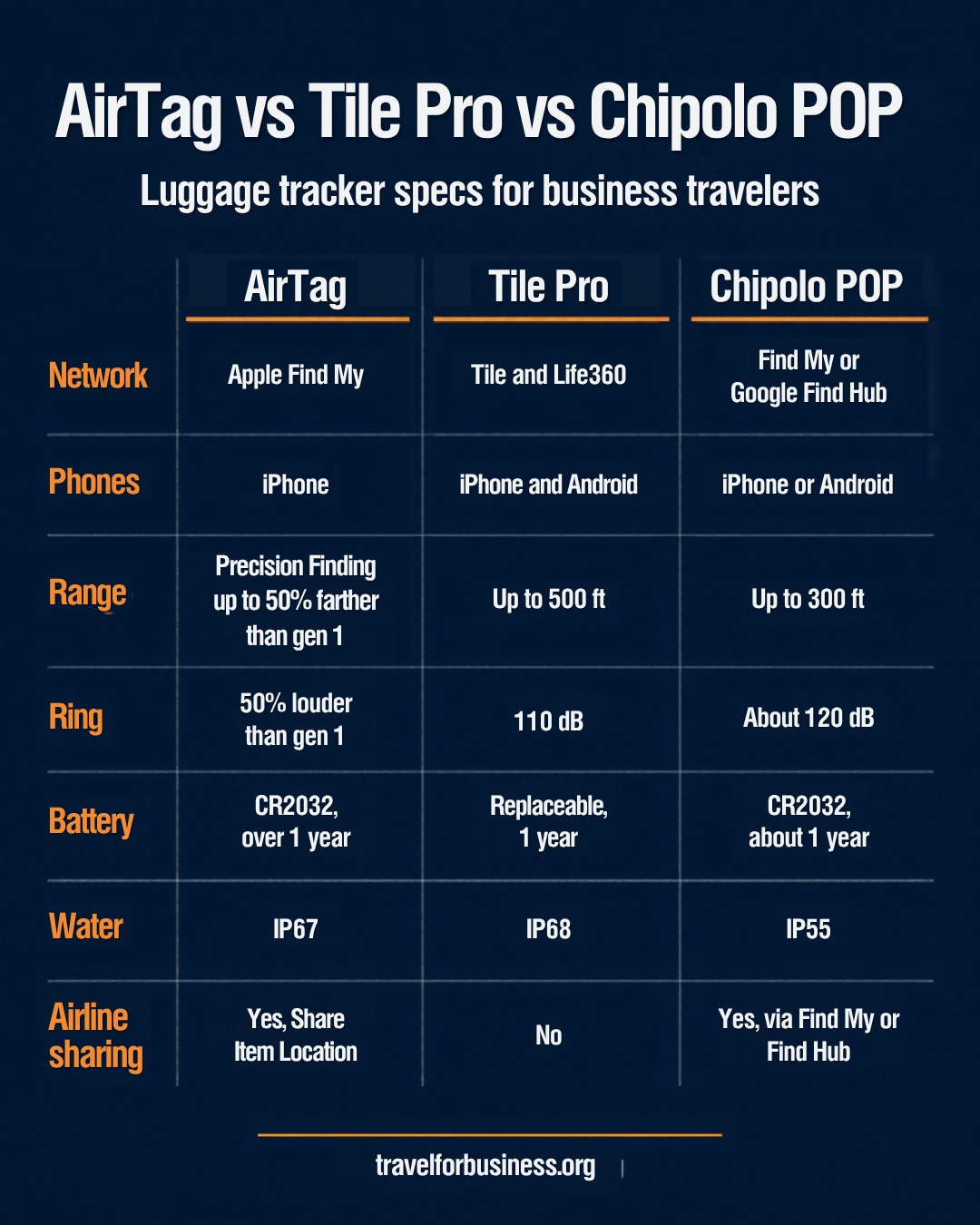
AirTag vs Tile vs Chipolo: Key Specs
| Spec | Apple AirTag (2nd gen) | Tile Pro | Chipolo POP |
|---|---|---|---|
| Network | Apple Find My | Tile network, Tile and Life360 apps | Apple Find My or Google Find Hub (one at a time) |
| Phones | iPhone (iOS 26 or later) | iPhone and Android | iPhone or Android |
| Range | Precision Finding up to 50% farther than gen 1 | Up to 500 ft | Up to 300 ft (90 m) |
| Ring | 50% louder than gen 1 | 110 dB | About 120 dB |
| Battery | CR2032, more than 1 year | Replaceable coin cell, 1 year | CR2032, about 1 year |
| Water and dust | IP67 | IP68 | IP55 |
| Airline location sharing | Yes, Share Item Location | No | Yes, through Find My or Find Hub |
| Buy | Check today’s price on Amazon | Check today’s price on Amazon | Check today’s price on Amazon |
Why the Network Matters More Than the Tracker
A luggage tracker is a small Bluetooth beacon. It does not have GPS or a SIM card. It only reports its position when a phone that belongs to the same network passes close enough to pick up the signal and relay it anonymously. Once your bag leaves your own Bluetooth range, the size of that crowd decides how often you get a location update.
- Apple Find My: every nearby iPhone, iPad and Mac with Find My enabled can relay the location. In airports, where iPhones are everywhere, updates come in often.
- Google Find Hub: Google’s network of Android phones, renamed from Find My Device. It works with Find Hub compatible trackers such as the Chipolo POP in Android mode.
- Tile network: relies on phones running the Tile or Life360 app. Life360 reported over 70 million monthly active users when it launched the current Tile line (Life360). That is a big community, but far smaller than the number of Apple or Android phones.
For a bag stuck in a transfer hub, the network with the most phones nearby usually wins. That is why AirTag is the default pick for iPhone users and a Find Hub tracker is the default for Android users.
Apple AirTag (2nd Generation)
Apple released the second generation AirTag on January 26, 2026 (Apple Newsroom). The outside looks the same, so all existing AirTag holders and luggage tags still fit. The changes are inside:
- A second generation Ultra Wideband chip. Precision Finding, the on-screen arrow that guides you to the item, works from up to 50% farther away than with the original AirTag.
- An upgraded Bluetooth chip that extends the range at which your iPhone can locate the tag.
- A speaker that is 50% louder, so you can hear it from up to twice as far away. Useful at a crowded carousel.
- Precision Finding on Apple Watch Series 9 or later and Apple Watch Ultra 2 or later.
- A user-replaceable CR2032 battery with more than a year of battery life and an IP67 rating (MacRumors).
The limits are clear. AirTag requires an iPhone or iPad on iOS 26 or iPadOS 26 or later. You cannot set it up or locate it from an Android phone. Precision Finding is also not available in countries that restrict Ultra Wideband technology, so check that before relying on it abroad.
Best for: anyone who travels with an iPhone. For most business travelers the 4-pack makes sense: one for the carry-on, one for the checked bag, one for the laptop bag and one for keys.
Tile Pro
Tile is owned by Life360, and the current Tile Pro is the most powerful tracker in its lineup. Life360 lists up to 500 ft of Bluetooth range, a 110 dB ring, an IP68 rating and a replaceable battery that lasts about a year (Life360 Tile models). Tile and Life360 apps run on both iPhone and Android, so the tracker keeps working if you switch phones or share it with a colleague on the other platform.
The current Tile line also has an SOS feature: press the button three times to send an alert to your Life360 Circle and emergency contacts. That alert is free. Contacting emergency dispatch through Tile requires a paid Gold or Platinum membership, available in the US, UK, Australia and Canada (Life360).
The trade-off is the network. Tile cannot use the Apple Find My or Google Find Hub crowds, and it does not support the airline location sharing programs described below. For a bag lost in a foreign airport, that is a real disadvantage.
Best for: teams with mixed phones, travelers who switch between iPhone and Android, and anyone who also wants a personal safety button.
Chipolo POP
The Chipolo POP solves the platform problem in a different way. One tracker works with Apple Find My on an iPhone or with Google Find Hub on an Android phone. You pick one network during setup: it works with either, but not both at the same time (Chipolo). If you change phones, you reset it and add it to the other network.
Chipolo lists a ring of about 120 dB, which makes it the loudest tracker in this comparison, plus up to 300 ft (90 m) of Bluetooth range and a replaceable CR2032 battery that lasts about a year. The weak point is water protection: IP55 handles splashes and dust, but not submersion. Inside a suitcase that is rarely an issue.
Prefer not to buy coin cells? The newer Chipolo LOOP also works with Find My or Find Hub and charges over USB-C, with up to a year per charge (9to5Toys).
Best for: Android users, and iPhone users who want a louder, colorful alternative to AirTag on the Find My network.
Which Luggage Tracker Fits You? Try the Tracker Picker
Choose your phone, the number of bags you want to track and your battery preference. The picker gives you the best match, a runner-up and how many trackers to buy.
Luggage Tracker Picker
Answer three questions and get the tracker that fits your phone, your bags and your battery preference.
Choose your options above.
Advice based on manufacturer specifications checked in October 2026. Airline location sharing depends on the airline and the network your tracker uses.
Sharing a Tracker Location with Your Airline
The biggest change for business travelers is that airlines now accept tracker data when you report a delayed bag.
Apple: Share Item Location
Since iOS 18.2 you can create a link to the live location of an AirTag or Find My network accessory in the Find My app and give it to a participating airline. Sharing stops once you have the item back, you can end it at any time, and the link expires automatically after seven days (Apple). Apple now works with more than 50 airlines. Citing SITA, Apple reports that carriers saw a 26% reduction in baggage delays and a 90% reduction in truly lost luggage (Apple Newsroom).
Google: Find Hub luggage sharing
In March 2026 Google added a similar feature to Find Hub. You share a link to your tracker through the airline’s app or website, and it expires after seven days or as soon as your phone detects the bag is back with you. Launch partners included Air India, China Airlines, the Lufthansa Group (Lufthansa, Austrian, Brussels Airlines and Swiss), Saudia, Scandinavian Airlines, Turkish Airlines and AJet, with Qantas to follow (9to5Google).
Tile Pro does not take part in either program. You can still tell the airline where the app shows your bag, but you cannot send a live link.
Are Luggage Trackers Allowed in Checked Bags?
Yes. The FAA has stated that luggage tracking devices may travel in checked bags if their lithium metal cells contain 0.3 grams of lithium or less, and that AirTags meet that threshold. Lufthansa briefly asked passengers to switch trackers off in 2022, then reversed that position after the German aviation authority agreed that low-power trackers pose no safety risk (AFAR). Trackers with a CR2032 coin cell, like the three in this guide, are small low-power devices of the same type, but check the battery details for any tracker you are unsure about.
How to Choose the Best Luggage Tracker for Business Travel
- Start with your phone. iPhone: AirTag. Android: a Find Hub tracker such as the Chipolo POP. Both, or a company that issues different phones: Tile Pro or a Chipolo you can move between networks.
- Check your airlines. If you fly carriers that accept Share Item Location or Find Hub links, choose a tracker on those networks.
- Count your bags. Track every bag that leaves your sight: checked suitcase, carry-on that may be gate-checked and a laptop bag that sits in an overhead bin.
- Think about battery swaps. Coin cell trackers last about a year and you can swap the battery anywhere. A rechargeable tracker saves buying batteries but needs a charge.
- Consider loudness. At a carousel with hundreds of black suitcases, a loud ring and Precision Finding save minutes.
Tips for Using a Luggage Tracker on Work Trips
- Hide the tracker inside the bag, for example in a zippered lining pocket, rather than on the outside handle where it can be torn off.
- Check the location in the app before you leave the arrivals hall. If the bag shows at your departure airport, report it before you leave.
- Set a calendar reminder to replace coin cells once a year, and pack a spare CR2032 in your tech pouch.
- Photograph your bag and its contents before check-in. It speeds up any claim.
- Pair your tracker with a hard-to-miss bag. Our guides to the best carry-on luggage and packing cubes help you build a setup that is easy to spot and quick to check.
- Remember that trackers are designed for objects. Apple and Google both build in alerts for unknown trackers, so do not use them to track people.
Final Verdict
For most business travelers, the best luggage tracker is the one that matches your phone. iPhone users should buy the AirTag (2nd generation): the Find My network is the largest, Precision Finding is the most precise way to find a bag at the carousel, and Share Item Location is accepted by more than 50 airlines. Android users get the closest equivalent with a Find Hub tracker such as the Chipolo POP, which is also the loudest of the three.
The Tile Pro is the right choice when your team mixes iPhone and Android, or when you want an SOS button in the same device. Just accept that its network is smaller and that you cannot send a live link to the airline.
Related Articles
- Top 10 Must-Have Accessories for Efficient Business Travel
- The Best Carry-On Luggage for Business Travelers in 2026
- Best Packing Cubes for Business Travel: Compression vs Standard
- Best Power Banks for Business Travel: Airline-Approved Picks
- Travel Routers and Hotel Wi-Fi Security: A Business Traveler’s Guide
- The Ultimate Guide to Business Travel Luggage Features
Frequently Asked Questions
Question: What is the best luggage tracker for business travel?
Answer: For iPhone users, the Apple AirTag (2nd generation), because it uses the large Find My network and supports Share Item Location with more than 50 airlines. For Android users, a Google Find Hub tracker such as the Chipolo POP. For mixed iPhone and Android teams, the Tile Pro.
Question: Does AirTag work with Android?
Answer: No. You need an iPhone or iPad on iOS 26 or iPadOS 26 or later to set up and locate the AirTag (2nd generation). Android phones can only detect an unknown AirTag traveling with them.
Question: Can I share my tracker location with an airline?
Answer: Yes, with AirTag and other Find My network accessories through Share Item Location, and with Find Hub trackers through Google Find Hub. Both links expire after seven days and stop when you have your bag back. Tile Pro does not support airline sharing.
Question: Can I put an AirTag in checked luggage?
Answer: Yes. The FAA allows luggage tracking devices in checked bags if their lithium metal cells contain 0.3 grams of lithium or less, and it has stated that AirTags meet this threshold.
Question: Does the Chipolo POP work with iPhone and Android at the same time?
Answer: No. It works with Apple Find My or Google Find Hub, but you choose one network during setup. To switch, reset the tracker and add it to the other network.
Question: How long does a luggage tracker battery last?
Answer: About a year for all three. The AirTag (2nd generation) is rated for more than a year on a CR2032 cell, the Tile Pro for one year on a replaceable coin cell and the Chipolo POP for about a year on a CR2032.