
Affiliate Disclaimer: TravelForBusiness.org participates in affiliate programs, including Amazon Associates and Simsima via Awin, and may earn a commission from qualifying purchases at no extra cost to you.
You land, switch off airplane mode and need three things in the first ten minutes: a ride to the hotel, the message from your client about the changed meeting room and a working map. On a work trip abroad that usually means one of two bad options: an expensive roaming day pass from your home carrier, or hunting for airport Wi-Fi. A travel eSIM fixes that before you even leave home. This guide to the eSIM for business travel explains how a travel eSIM works, how it compares with roaming and local SIM cards, how much data a work trip really needs, and which plan fits which trip.
The short version: a data-only travel eSIM, installed at home and switched on when you land, gives you local mobile data from the jet bridge while your own number stays active for calls, texts and two-factor codes.
Quick answer
- Our pick for business travelers: Simsima, a travel eSIM with plans for 190+ destinations, a Europe plan that covers 41 countries on one eSIM, hotspot listed as allowed on the plans we checked, and a 14-day refund if the eSIM has not been activated.
- One country: a country plan with fixed data, sized with the planner below.
- Several European countries: one regional Europe plan instead of a new SIM at every border.
- Several continents: a Global plan, after checking that every stop is on the country list.
What a Travel eSIM Is (and What It Is Not)
An eSIM is a SIM profile that your phone downloads instead of a plastic card. A travel eSIM is a prepaid data plan for another country or region that you install as a second line. Your home SIM or home eSIM stays in the phone. Abroad, you set the travel eSIM as the line for mobile data and keep your home line for calls and text messages.
Two things matter for business travelers. First, travel eSIMs like Simsima are data only: there is no local phone number and no regular calls or texts on the travel line. WhatsApp, Teams, Zoom, FaceTime and iMessage run over the data connection as usual. Second, your own number keeps working on your home line, so you still receive calls and SMS codes from your bank or your company login. Simsima notes that your carrier may charge for calls you receive abroad, so check your carrier’s roaming rates for incoming calls (Simsima).
Your phone has to support eSIM and be carrier-unlocked. Simsima lists the iPhone XS and newer, the Samsung Galaxy S20 and newer and the Google Pixel 3 and newer as compatible, and has a device checker for other models. A company phone may also be locked down by your IT department, more on that below.
Travel eSIM vs Roaming vs Local SIM vs Pocket Wi-Fi
There are four common ways to stay online abroad. This is how they compare on the things that matter during a work trip:
| Travel eSIM | Carrier roaming | Local SIM card | Pocket Wi-Fi | |
|---|---|---|---|---|
| Set up | Online, at home | Nothing to set up | At a counter or shop after landing | Pick up and return a device |
| Online on arrival | Yes | Yes | After you buy it | After pickup |
| Your own number | Stays active on your home line | Stays active | Replaced by a local number unless your phone has dual SIM | Stays on your phone |
| ID at purchase | None at Simsima | None | Often required | Depends on the rental company |
| Several countries | One regional plan | Depends on your plan | A new SIM per country | Often one country per device |
| Cost model | Prepaid, paid once | Often per day or per MB | Prepaid local rates | Daily rental |
Roaming is the easiest option, and inside the EU a European plan often includes roaming at home rates. Outside that, many carriers bill by the day, which adds up on a two-week project. A local SIM is cheap per gigabyte but costs time at the airport and swaps out your own number on single-SIM phones. Pocket Wi-Fi is one more device to charge and return. For most business trips, a travel eSIM is the fastest and most predictable option.
Why We Recommend Simsima for Business Trips
Simsima is a Barcelona-based travel eSIM provider. These are the plan features we checked on its site in October 2026 that matter most for work travel:
- Install before you fly, pay for the trip only. You can install the eSIM at home over Wi-Fi. The plan only starts when it first connects to a network at your destination, and you have 180 days from purchase to activate it (Simsima United States plan page).
- One eSIM for a European tour. The Europe plan covers 41 countries, including the UK, Switzerland and Turkey, with 5G in 34 of them. A few countries are not included, such as Andorra, Monaco and Moldova (Simsima Europe plan page).
- Hotspot for your laptop. The plan pages we checked for the United States, the United Kingdom, Japan and Europe list hotspot and tethering as allowed. Check the plan page for your destination before you rely on it.
- Top-ups on the same eSIM. If a trip runs long, you add data from your Simsima account without installing anything new.
- No ID check. You pay by card or Apple Pay or Google Pay and receive the eSIM by email. Simsima also accepts some cryptocurrencies.
- Refund if you do not travel. As long as the eSIM has not been activated, Simsima refunds it on request within 14 days of purchase. Once it is installed and connected, a refund generally no longer applies (Simsima refund policy).
- Credit for the next trip. Every purchase through the links on this page earns 4% back in SimCoins, and Trip Packs take 5% off two countries, 10% off three and 15% off five or more.
- Reader code. Code TFB takes 5% off your first Simsima order. It only works when you open Simsima through one of the links on this page, and it replaces the SimCoins cashback on that order, so use the code or take the cashback.
Unlimited plans are available for many destinations, but like every travel eSIM sold as unlimited, they give you full speed up to a daily allowance and then slow down until the next day. On the United States plan that allowance was 2 GB a day and on the Europe plan 5 GB a day when we checked. For video calls on mobile data, a large fixed plan is often the more predictable choice.
A Budget Alternative: eSIM For U
eSIM For U is a newer travel eSIM provider, run from Vienna, Austria, with data plans for more than 200 destinations. You buy a plan on the website or in the iOS or Android app, and you can top up the same eSIM later without installing a new one. Its track record is shorter than Simsima’s, so we see it as a backup option rather than our first pick, but it is worth a price check for a single-country trip.
New customers get 10% off their first eSIM with code WELCOME10. The code works once per account, on most plans but not on some of the largest data plans, and runs through December 31, 2027.
How Much Data Does a Business Trip Need?
Most business travelers use less mobile data than they think, as long as the big things happen on hotel or office Wi-Fi. Simsima plans around 717 MB a day for an average traveler, based on figures from BEREC, the European telecom regulator (Simsima). Video calls change the picture fast: Zoom lists 1.2 Mbps up and 1.2 Mbps down for a one-on-one call in 720p HD (Zoom), which works out to roughly 1 GB per hour. Tethering a laptop adds background syncs, updates and cloud backups on top of your actual work.
Use the planner to size your plan. It is set up for the way business travelers work: destination, trip length, video calls on mobile data and laptop hours on the hotspot.
Business Trip eSIM Data Planner
Pick your destination, trip length and how you work on the road. The planner estimates how much data you need and which plan type fits.
Fill in the fields above.
Reader code TFB: 5% off your first Simsima order. It only works through the buttons above and replaces the 4% SimCoins cashback on that order.
Estimate only. Assumptions: about 0.7 GB a day of normal phone use (maps, email, messaging, ride-hailing), about 1 GB per hour of HD video call (Zoom lists 1.2 Mbps up and down for 720p), about 0.25 GB per hour of laptop work without video, plus a 20 percent buffer. Plan types and plan facts checked on simsima.io in October 2026; always check the plan page before you buy.
A tip for laptop users: on Windows, set the hotspot connection as metered, and on a Mac pause cloud sync and automatic updates while you are tethered. That keeps a 10 GB plan from disappearing in one afternoon.
Which Plan for Which Trip
One country
For a single destination, a country plan with fixed data is usually the best fit. Popular business destinations on Simsima include the United States, the United Kingdom, Germany, France, the Netherlands, Japan, Singapore, the United Arab Emirates, Canada and Mexico.
A European roadshow
London on Monday, Frankfurt on Wednesday, Zurich on Friday: that is where the Europe plan shines. Your phone joins a partner network at each border with the same eSIM and the same data balance. Because the UK, Switzerland and Turkey are included, it also avoids the extra charges that EU phone plans can add in those three countries.
Several continents
For a trip that combines, say, New York, London and Singapore, look at the Global plan. It covers 193 countries on one eSIM, but a few countries are missing, so check every stop on the map on the plan page. If one stop is a long stay with heavy data use, a separate country plan for that stop can be the better deal.
How to Set Up a Travel eSIM Before a Business Trip
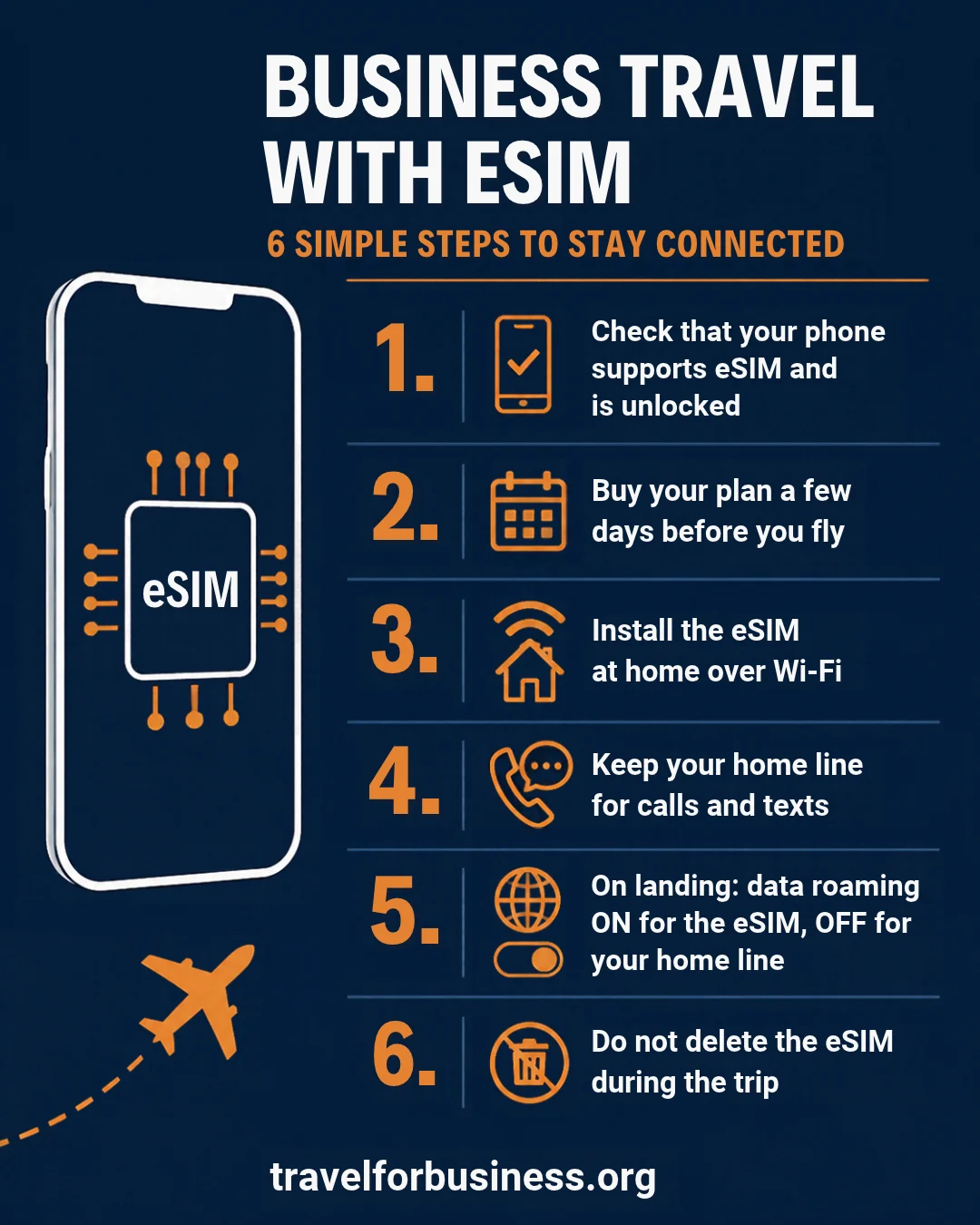
- Check your phone. Make sure it supports eSIM and is carrier-unlocked. On iPhone, look under Settings, General, About for Carrier Lock.
- Buy the plan a few days before you fly. The QR code arrives by email and in your account.
- Install at home over Wi-Fi. On iPhone: Settings, Cellular, Add eSIM, then scan the QR code or use the one-tap install link. Label the line, for example “Travel data”.
- Keep your home line for calls and texts. Choose the travel eSIM for data only.
- When you land, switch data to the travel eSIM. Turn on Data Roaming for the travel line only. Turn Data Roaming off on your home line so your carrier cannot bill you abroad, and on iPhone turn off Allow Cellular Data Switching.
- Do not delete the eSIM during the trip. An eSIM can be installed only once. If you remove it, you need Simsima support to help you reinstall it.
Business Travel Tips for Using an eSIM
- Company phone? Ask IT first. Many managed phones block adding an eSIM, and some companies have a global roaming deal already. Ten minutes with IT before the trip saves a support call from the hotel.
- Two-factor codes still arrive on your home number. Keep your home line switched on for SMS. If your carrier charges for incoming texts abroad, move logins to an authenticator app where you can.
- Prefer mobile data over hotel Wi-Fi for sensitive work. Your own mobile connection is not shared with other guests. If you do use hotel Wi-Fi, a travel router with a VPN is the safer setup.
- Pack a power bank. Hotspot use drains your battery quickly. An airline-approved power bank keeps you going through a day of meetings.
- Keep the receipt for your expense report. The Simsima order email shows the plan and the amount, which is usually enough for an expense claim. Check your company policy and how your per diem handles connectivity.
- Turn on Low Data Mode on long trips. It pauses background updates and syncs on the travel line.
Common Mistakes to Avoid
- Leaving Data Roaming on for your home line, so your phone keeps using your carrier abroad.
- Installing the eSIM after landing without Wi-Fi. You need a connection to download the profile.
- Assuming “unlimited” means unlimited full speed. Check the daily high-speed allowance on the plan page.
- Buying a single-country plan for a trip that crosses borders. A regional plan covers every stop on one eSIM.
- Tethering a laptop that starts a cloud backup or a big system update the moment it connects.
Final Verdict
For most business trips abroad, a travel eSIM is the easiest way to stay connected: installed at home, online the moment you land, and your own number still reachable. We recommend Simsima because it combines country, Europe and Global plans with hotspot on the plans we checked, top-ups on the same eSIM and a refund window if your trip is cancelled before you activate the eSIM.
Size your plan with the planner above, pick a regional plan if you cross borders, and switch data roaming off on your home line when you land.
Related Articles
- Travel Routers and Hotel Wi-Fi Security: A Business Traveler’s Guide
- Best Power Banks for Business Travel: Airline-Approved Picks
- Best Universal Travel Adapters for Business Travelers
- 5-Day Business Trip Packing List: A Full Work Week in a Carry-On
- How to Beat Jet Lag on Business Trips
- Top 10 Must-Have Accessories for Efficient Business Travel
Frequently Asked Questions
Question: What is the best eSIM for business travel?
Answer: The best eSIM for business travel is one that covers every stop on your route, allows hotspot for your laptop, can be topped up on the same eSIM and lets you keep your own number for calls and SMS codes. We recommend Simsima, which offers country, Europe and Global plans and lists hotspot as allowed on the plans we checked.
Question: Can I keep my phone number with a travel eSIM?
Answer: Yes. A data-only travel eSIM runs next to your home line. Your number keeps receiving calls and texts, including bank and login codes, while the eSIM handles data. Your carrier may still charge for calls you receive abroad.
Question: Can I use a travel eSIM as a hotspot for my laptop?
Answer: Usually yes, but it depends on the plan. Simsima lists hotspot and tethering as allowed on the plan pages we checked for the United States, the United Kingdom, Japan and Europe. Check the plan page for your destination before you buy.
Question: When should I install my travel eSIM?
Answer: Install it at home over Wi-Fi a few days before your trip. With Simsima the plan only starts when the eSIM first connects to a network at your destination, so installing early does not use up the validity.
Question: How much data do I need for a business trip?
Answer: Around 0.7 GB a day covers maps, email, messaging and ride-hailing. Add roughly 1 GB per hour of HD video calls on mobile data, and more if you tether a laptop. Use the planner in this article for an estimate for your own trip.
Question: Can I get a refund if my trip is cancelled?
Answer: With Simsima, yes, as long as the eSIM has not been activated: support refunds it on request within 14 days of purchase. Once the eSIM is installed and connected, a refund generally no longer applies.