
Affiliate Disclaimer: TravelForBusiness.org participates in affiliate programs, including Amazon Associates, and may earn a commission from qualifying purchases at no extra cost to you.
A hotel desk is rarely a good desk. The chair is too low, the laptop screen sits far below eye level and after a day of calls and spreadsheets your neck pays the price. The fix fits in a laptop bag: a stand that lifts the screen and, if you work with a lot of data, a second screen. This guide covers the best portable monitor for business travel and the laptop stands that pair with it, from a 192 g flat stand for the tray table to a full two-screen setup for client weeks.
We checked every spec against manufacturer pages and authorized retailer listings in November 2026, and built a free Mobile Office Builder tool that suggests a setup for where you work and adds up what it weighs in your bag.
Quick picks
- Best portable monitor for most travelers: ASUS ZenScreen MB16ACV, 15.6 inch Full HD, 900 g, one USB-C cable for video and power.
- Best lightweight and sharpest monitor: Lenovo ThinkVision M14d, 14 inch 2240 x 1400, 600 g with stand.
- Best laptop stand for travel: Roost V3, about 170 g, lifts the screen 6.5 to 12.5 inches.
- Best value tower stand: Nexstand K2, 234 g, 8 heights, rated for 9 kg.
- Best for tray tables and lounges: MOFT Invisible Stand, a flat stand with 15 and 25 degree angles.
Why a Mobile Office Setup Matters on Business Trips
OSHA advises placing the top of the screen at or slightly below eye level and keeping it 20 to 40 inches from your eyes (OSHA computer workstation guidance). A laptop on a hotel desk breaks both rules: the screen is low and the keyboard forces it close. A tower stand solves the height problem; a compact keyboard and mouse solve the distance. A portable monitor adds the second screen that most of us rely on at the office for comparing documents, following a deck while presenting or keeping a call open next to your notes.
The trade-off is weight. A stand adds 170 to 270 g, a monitor 600 to 900 g. For a two-night trip with mostly calls, a stand alone is enough. For a week of analysis at a client site, the monitor earns its place. If you are planning the full bag, our 5-day business trip packing list shows where the extra gear fits.
Best Portable Monitors for Business Travel
ASUS ZenScreen MB16ACV: best all-round portable monitor
The MB16ACV is the safe choice for a 15 or 16 inch laptop. ASUS lists a 15.6 inch IPS panel at 1920 x 1080, 250 nits typical brightness, a 60 Hz maximum refresh rate and an anti-glare finish. A single USB-C port carries video (DisplayPort Alt Mode) and USB 3.2, and the monitor draws power over the same cable at 5V and 3A, with 6.64 W typical consumption (ASUS tech specs).
It weighs 0.9 kg and measures 35.8 x 22.5 x 1.0 cm. The built-in kickstand tilts from 15 to 35 degrees, there is a 1/4 inch tripod socket for a mount, and ASUS includes a sleeve. It carries TUV Low Blue Light and Flicker-free certifications plus an antibacterial treatment on the surface (ASUS). There are no speakers and no HDMI input, so it needs a laptop with a video-capable USB-C port.
- Pros: matches a 15 to 16 inch laptop screen, one-cable setup, sleeve included, tripod socket.
- Cons: 250 nits is fine indoors but dim near a bright window; Full HD only; no HDMI.
Lenovo ThinkVision M14d: best lightweight portable monitor
The M14d is the monitor for travelers who count grams and work with text and spreadsheets. Lenovo lists a 14 inch IPS panel at 2240 x 1400 (16:10, 189 ppi), 300 nits typical and 375 nits peak brightness. It weighs 0.6 kg with its stand, tilts from -5 to +95 degrees and lifts 11 mm. It has two USB-C ports with DisplayPort 1.2 Alt Mode, and Lenovo gives it a 3-year warranty (Lenovo PSREF). The second USB-C port lets you pass power through to the laptop; Tom’s Hardware reported up to 65 W at launch (Tom’s Hardware).
The taller 16:10 shape shows more rows of a spreadsheet than a 16:9 screen of similar width, and the higher pixel density makes small text sharper than on the ASUS. The smaller screen is the only real compromise, and it pairs best with a 13 or 14 inch laptop.
- Pros: 300 g lighter than the ASUS, sharper 2.2K panel, two USB-C ports, flexible stand, 3-year warranty.
- Cons: 14 inch screen feels small next to a 16 inch laptop; needs DisplayPort Alt Mode over USB-C.
Best Laptop Stands for Travel
Roost V3: best travel laptop stand
The Roost is the stand road warriors have carried for years. Retail listings put it at 6 oz with a screen lift of 6.5 to 12.5 inches, for laptops from 12 to 18 inches, held by self-adjusting PivotGrips. Folded, it measures 1 x 1.5 x 13 inches, so it slides into a laptop sleeve. Pack Hacker counts seven height levels and praises the self-locking mechanism, but notes that the thin frame may feel lacking under heavier laptops and that tall users may want more height (Pack Hacker).
Roost also sells a V3 Plus with 11 heights and a 5 to 14 inch lift. Whichever version you choose, you need a separate keyboard and mouse once the laptop sits at eye level; our tech organizer guide shows how to keep them and their cables together.
Nexstand K2: best value tower stand
The Nexstand K2 does the same job for less money and handles heavier machines. It weighs 234 g, folds to about 35.5 x 3.8 x 3.8 cm, offers 8 height settings between roughly 14 and 32 cm and is rated for 9 kg. It works with laptops of 11.6 inches and up whose front edge is under 2 cm thick and whose keyboard is wider than 27.5 cm (PB Tech spec sheet).
Pack Hacker scores it lower than the Roost: the reinforced nylon feels less sturdy, the hard rubber grips hold the laptop less firmly and the small spacer clips are easy to lose (Pack Hacker). For a heavy 16 or 17 inch work laptop, the higher load rating still makes it a sensible pick.
MOFT Invisible Stand: best for tray tables and lounges
Tower stands need a real desk and an external keyboard. On a train tray, at the gate or in a lounge you keep typing on the laptop, and a flat stand is the better tool. The MOFT Invisible Stand is 4.1 mm thick and weighs 192 g in the standard size (11 to 14 inch laptops) or 272 g in the large size (15 inch and up). It offers 25 degrees for viewing and 15 degrees for typing, holds up to 5 kg and uses an anti-slip base instead of adhesive. MOFT does not support 17 inch laptops and recommends the large size for the 14 inch MacBook Pro (MOFT).
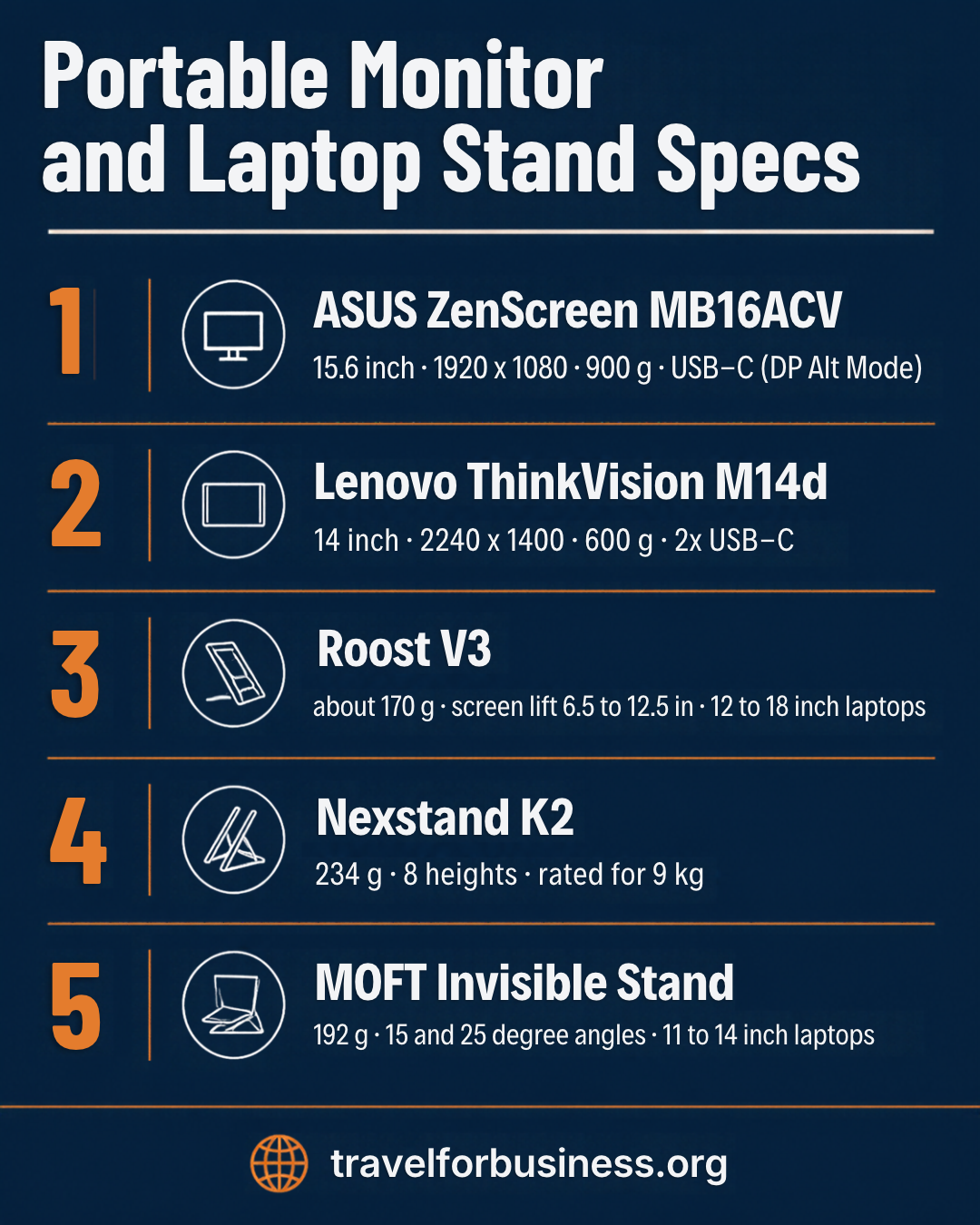
Comparison Table
| Product | Type | Weight | Key specs | Best for | Buy |
|---|---|---|---|---|---|
| ASUS ZenScreen MB16ACV | Monitor | 900 g | 15.6 in, 1920 x 1080, 250 nits, 1x USB-C | 15 to 16 inch laptops | Check today’s price on Amazon |
| Lenovo ThinkVision M14d | Monitor | 600 g | 14 in, 2240 x 1400, 300 nits, 2x USB-C | Light packers, spreadsheets | Check today’s price on Amazon |
| Roost V3 | Tower stand | about 170 g | 6.5 to 12.5 in lift, 12 to 18 in laptops | Hotel desks, client offices | Check today’s price on Amazon |
| Nexstand K2 | Tower stand | 234 g | 8 heights, rated 9 kg | Heavier laptops, value | Check today’s price on Amazon |
| MOFT Invisible Stand | Flat stand | 192 or 272 g | 15 and 25 degrees, up to 5 kg | Tray tables, lounges | Check today’s price on Amazon |
Try It: Mobile Office Builder
Choose where you work, your laptop size, the work you do and how much weight you accept. The builder suggests a stand and monitor combination, explains why and adds up the weight it puts in your bag.
Mobile Office Builder
Tell us where you work on the road, what laptop you carry and what you do. The builder suggests a stand and monitor setup and adds up the weight it puts in your bag.
Choose your options and press Build my setup.
Your kit
Good to know
Weights from manufacturer and retailer listings checked November 2026: Roost V3 about 170 g (6 oz), Nexstand K2 234 g, MOFT Invisible Stand 192 g (standard) or 272 g (large), Lenovo ThinkVision M14d 600 g with stand, ASUS ZenScreen MB16ACV 900 g. Keyboard and mouse weights are typical values for compact Bluetooth models; check your own.
How to Choose a Portable Monitor and Laptop Stand
- Check your USB-C port first. Both monitors here need a USB-C port with DisplayPort Alt Mode or Thunderbolt. Look for a DisplayPort or lightning bolt icon next to the port. Base M1 and M2 MacBook Air models support one external display; base M3 models support two only with the lid closed, and base M4 and M5 models support two (Plugable).
- Match the screen to your laptop. A 15.6 inch monitor next to a 15 or 16 inch laptop keeps windows the same size. With a 13 or 14 inch laptop, a 14 inch monitor is lighter and looks balanced.
- Count the grams. A monitor, stand, keyboard and mouse add 1.2 to 1.6 kg. If your bag is already close to an airline weight limit, start with a stand only.
- Think about where you work. Tower stands need a desk; flat stands work anywhere. Many frequent travelers carry both and pick per trip.
- Brightness matters near windows. 250 to 300 nits is fine for hotel rooms and offices but struggles in direct daylight.
Tips for Working on the Road
- Keep the monitor in its sleeve between the laptop and the back panel of your bag. Our guide to the best laptop backpacks for business travel covers bags with a padded sleeve deep enough for two devices.
- At security, remove the laptop and place it in a separate bin unless you have TSA PreCheck (TSA). Pack the monitor where you can lift it out quickly too, in case an officer asks.
- Bring one longer USB-C cable so the monitor can sit beside the laptop instead of in front of it. A compact charger and a travel power bank keep both running when outlets are scarce.
- Hotel Wi-Fi plus a second screen often means video calls. A travel router keeps the connection stable and private.
- Abroad, check the plug type before you leave; our universal travel adapter guide lists the best options.
Final Verdict
For most business travelers, a tower stand plus a compact keyboard and mouse is the upgrade with the biggest payoff: about 600 g in your bag for a screen at a healthy height in every hotel room. The Roost V3 is the best travel stand, the Nexstand K2 the value pick for heavier laptops, and the MOFT Invisible Stand covers tray tables and lounges.
Add a portable monitor when you spend full days on data, slides or documents. The ASUS ZenScreen MB16ACV is the easy match for a 15 or 16 inch laptop, while the Lenovo ThinkVision M14d is lighter and sharper for travelers who pack light. Not sure which combination you need? Run your trip through the Mobile Office Builder above.
Related Articles
- Top 10 Must-Have Accessories for Efficient Business Travel
- Best Tech Organizers and Cable Pouches for Business Travel
- Best Power Banks for Business Travel: Airline-Approved Picks
- Travel Routers and Hotel Wi-Fi Security: A Business Traveler’s Guide
- Best Noise-Cancelling Headphones for Business Travel
- The Best Laptop Backpacks for Business Travel: Tumi, Nomatic and More
Frequently Asked Questions
Question: What is the best portable monitor for business travel?
Answer: For a 15 or 16 inch laptop, the ASUS ZenScreen MB16ACV: 15.6 inch Full HD, 900 g, one USB-C cable for video and power, sleeve included. For the lightest setup and the sharpest text, the 600 g Lenovo ThinkVision M14d with its 2240 x 1400 screen.
Question: Will a portable monitor work with my laptop?
Answer: Both monitors in this guide need a USB-C port that supports DisplayPort Alt Mode or Thunderbolt. Most recent business laptops and MacBooks have one, but base M1 and M2 MacBook Air models support only one external display.
Question: Do I need a keyboard with a laptop stand?
Answer: With a tower stand like the Roost or Nexstand, yes. The laptop keyboard ends up too high to type on comfortably, so pack a compact Bluetooth keyboard and mouse. With a flat stand like the MOFT you keep using the laptop keyboard.
Question: Can I take a portable monitor in my carry-on?
Answer: Yes. Neither monitor in this guide has a built-in battery, so they can go in carry-on or checked bags. Keep yours in the cabin to avoid damage, and be ready to take it out at security like a laptop.
Question: Which laptop stand is the lightest?
Answer: The Roost V3 at about 170 g is the lightest tower stand here. The MOFT Invisible Stand weighs 192 g in the standard size but is flat and only tilts the laptop to 15 or 25 degrees.
Question: Is a portable monitor worth the extra weight?
Answer: If you spend full days on spreadsheets, slides or comparing documents, yes: a second screen saves constant window switching. For trips with mostly meetings and email, a stand alone gives you better posture for far less weight.